
Why My App Uses Two AI Backends
On-device FoundationModels + cloud API in the same iOS app — when to use which, and how they coexist.

I’m building PickleRite — a pickleball performance tracker for iOS and Apple Watch. Players log sessions, track their mistakes (serves, dinks, volleys, kitchen faults), and get AI-powered coaching insights.
One part of the AI runs entirely on-device using Apple’s FoundationModels framework.
The other part calls a backend API with server-side tool routing.
Not because I couldn’t pick one, but because each solves a fundamentally different problem.
The Two AI Features
On-Device: Performance Summary + Focus Messages
When a player opens the AI Analysis tab, the app generates a full coaching report — overall insight, error breakdown, drill recommendations, and a motivational closing. Each error card in the Analytics tab also generates a short one-liner coaching message (”Solid progress on serves, keep it locked!”).
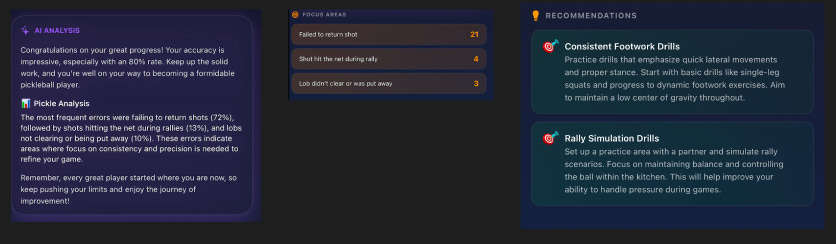
These features use **Apple’s FoundationModels framework** — the on-device LLM that ships with iOS 26. No network call, no API key, no cost per token.
Cloud: RiteAI Chat
RiteAI is an open-ended chat interface where players ask anything about their performance: “What are my most common mistakes?”, “When do I perform best?”, “Suggest drills for my weak areas.” This calls a **backend API** at `api.picklerite.com` that routes questions to the right tool, queries the player’s session data, and returns a rich response with confidence scores and reasoning.
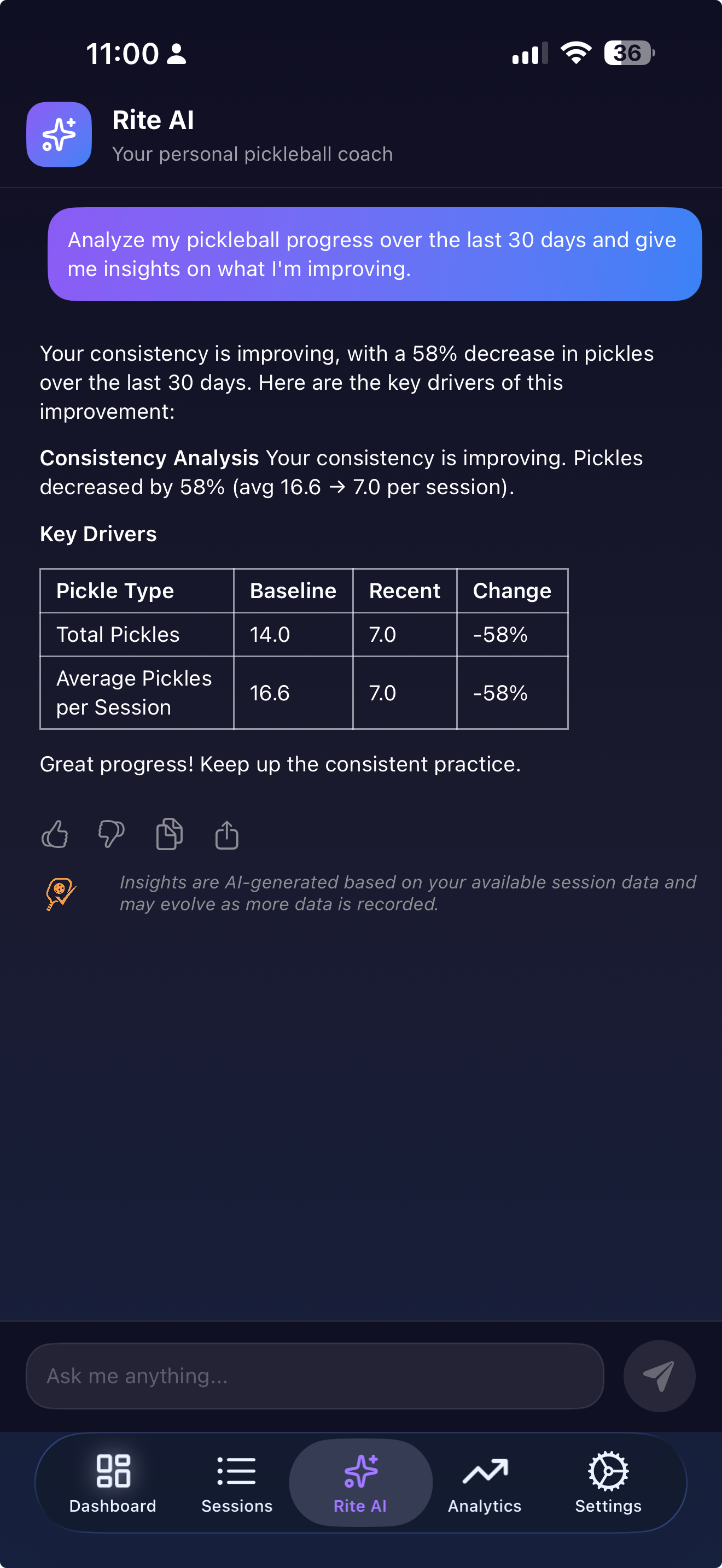
Two AI systems, one app. Here’s why.
Why Not Just Pick One?
The short answer: on-device AI is free and private but constrained.
Cloud AI is flexible but costs money and requires connectivity.
The longer answer involves understanding what each backend is actually good at.
On-Device Strengths
Zero cost, zero latency (after first load), total privacy. Apple’s FoundationModels run entirely on the Neural Engine. The player’s session data never leaves their iPhone. There’s no per-token billing, no API rate limits to worry about in production, and it works on airplane mode.
Structured output with type safety.This is the killer feature. FoundationModels supports `@Generable` — a macro that forces the LLM to return a strongly-typed Swift struct. No JSON parsing, no string extraction, no “the model returned markdown instead of JSON” bugs:
@Generable
struct AISummary {
    @Guide(description: "Overall performance insight and analysis text")
    let overallInsight: String

    @Guide(description: "Error breakdown analysis with specific insights")
    let errorAnalysis: String

    @Guide(description: "2-3 personalized drill recommendations")
    let recommendations: [Recommendation]

    @Guide(description: "Motivational closing message")
    let motivationalClosing: String
}
The `@Guide` annotations are inline prompt engineering — they tell the model what each field should contain. The compiler enforces the structure. If the model can’t fill a field, you get a `decodingFailure` error, not a malformed string you have to parse at runtime.
Calling it is clean:
let session = LanguageModelSession(instructions: instructions)

let response = try await session.respond(to: prompt, generating: AISummary.self)**Streaming with partial types.** FoundationModels also gives you a `PartiallyGenerated` type automatically — every field becomes optional, so you can show tokens as they arrive:
let stream = session.streamResponse(to: prompt, generating: AISummary.self)

for try await snapshot in stream {
      // snapshot.content is AISummary.PartiallyGenerated
      // Fields are optional — they fill in as the model generates
      streamingOverallInsight = snapshot.content.overallInsight ?? “”
      streamingErrorAnalysis = snapshot.content.errorAnalysis ?? “”
}

let completed = try await stream.collect()
This gives a ChatGPT-like streaming UX with full type safety. No parsing partial JSON.
On-Device Limitations
It can’t answer arbitrary questions. FoundationModels is great at structured generation — fill in these fields given this context. But it can’t query a database, call an API, or reason over data it hasn’t been given in the prompt. If a player asks “How did I do compared to last month?” the on-device model has no way to fetch last month’s data unless you pre-load it into the prompt.
Context window is smaller. You’re working with whatever Apple ships on-device. You can’t send 50 sessions worth of detailed data in a single prompt.
iOS 26+ only. Not every user will be on the latest OS. You need graceful degradation.
Cloud Strengths
Tool routing and data access. The RiteAI backend doesn’t just answer questions — it routes them. The response includes routing metadata that tells you how the question was classified and which tool handled it:
struct QuestionResponse: Codable {
    let question: String
    let answer: String
    let confidence: Double
    let reasoning: String
    let sources: [String]
    let toolUsed: String
    let routing: QuestionRouting?
}

struct QuestionRouting: Codable {
    let intent: String
    let routingPath: [String]
    let intentRouting: QuestionRoutingDetail?
    let toolRouting: QuestionRoutingDetail?
}
When a player asks “What are my most common mistakes?”, the server classifies the intent, routes to a tool that queries their session history, runs the analysis, and returns a structured response with confidence and reasoning. The on-device model can’t do any of this.
Handles open-ended questions. “When do I typically perform best?” requires querying historical data across time ranges, computing aggregates, and generating a natural language summary. This is exactly what a server with database access excels at.
No OS version requirement. Cloud AI works on any iOS version the app supports.
### Cloud Limitations
Costs money per call. Every question is a server-side LLM invocation. I use daily rate limiting via PostHog feature flags to keep costs manageable:
var maxDailyMessages: Int {
    featureFlags.riteAIDailyLimit // Remote config, -1 = unlimited
}

var isDailyLimitReached: Bool {
       if maxDailyMessages < 0 { return false }
       return dailyMessageCount >= maxDailyMessages
}
Requires network. No connectivity, no RiteAI.
Privacy tradeoff. The player’s question (and implicitly, their session data via the backend query) travels over the network.
The Decision Framework
Here’s how I decide which backend handles a feature:
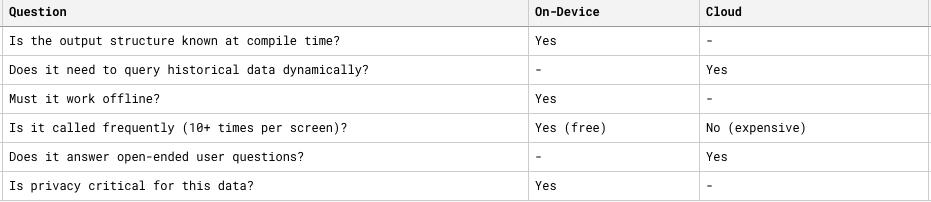
The rule of thumb: If you know exactly what you want the AI to produce and you have all the data upfront, use on-device. If the user is driving the conversation and the AI needs to fetch/compute data, use cloud.
Architecture: How They Coexist
The on-device path is built around an **Action** that wraps `LanguageModelSession`. The action builds a prompt from session data, calls the model, and returns a typed `AISummary`:
struct AIAnalysisAction {
    let state: PickleRiteState
  func execute(
      onStreamUpdate: ((AISummary.PartiallyGenerated) -> Void)? = nil
   ) async -> AISummary? {
      let appConfig = Config.loadConfig()
      let instructions = appConfig.ai.performanceSummary.instructions
      let prompt = buildPrompt()
      let session = LanguageModelSession(instructions: instructions)
      if let onStreamUpdate = onStreamUpdate {
           // Streaming: token-by-token updates to the UI
          let stream = session.streamResponse(to: prompt, generating: AISummary.self)
          for try await snapshot in stream {
               onStreamUpdate(snapshot.content)
           }
      return try await stream.collect().content
   } else {
       // One-shot: wait for the full response
      let response = try await session.respond(to: prompt, generating: AISummary.self)
      return response.content
   }
 }
}
The prompt itself is assembled from live session data — error counts, percentages, session totals — and injected into a template loaded from config. All the data the model needs is passed upfront in the prompt. There’s no back-and-forth, no tool calls, no database queries. That’s the key constraint of on-device: **you give it everything, it gives you a structured answer.**
For repeat visits, the on-device path uses a cache layer so users see instant results instead of a spinner. I covered that architecture in depth in [Part 1 of this series]
### Cloud Path
The cloud path is architecturally different — it’s a **stateless request-response** cycle where the intelligence lives on the server:
@MainActor
private func sendQuestionToAPI(question: String) async {
    riteAIState.isLoading = true
    do {
       let response = try await usecase.askQuestion(question: question)
       riteAIState.addAIMessage(response.answer)
     } catch {
        riteAIState.addAIMessage(“Sorry, I couldn’t process your question. Please try again.”)
    }
    riteAIState.isLoading = false
}
The client side is deliberately thin. It sends a question, gets an answer, displays it. All the heavy lifting — intent classification, tool routing, data querying, response generation — happens server-side. The client doesn’t need to know *how* the answer was produced.
The request includes the device’s timezone so the server can resolve relative date references (”how did I do this week?”):
struct QuestionRequest: Codable {
   let question: String
   let timezone: String // TimeZone.current.identifier
}
Graceful Degradation
Every on-device AI feature is gated behind `@available(iOS 26.0, *)`. On older devices, the Analytics tab shows hardcoded fallback messages instead of AI-generated ones, and the AI Analysis tab shows an upgrade prompt. RiteAI (cloud) works on all supported iOS versions.
This means no user gets a broken experience — they just get progressively more AI as their OS supports it.
## Config-Driven Prompts: One Pattern for Both
One thing I kept consistent across both backends: **prompts are externalized, not hardcoded**. All on-device prompts live in a YAML config file:
ai:
performanceSummary:
 instructions: |
    You are a professional pickleball coach and performance analyst...
    Analyze the session data in four distinct sections:
        1. Overall Performance Insight
        2. Error Breakdown Analysis
        3. Personalized Drill Recommendations
        4. Motivational Closing

 prompt: |
      ## Session Data
         {sessionContext}
      ## Your Task
      Analyze this session data and generate a comprehensive summary...

 focusMessage:
   instructions: “You are a concise pickleball coach providing brief, punchy feedback.”
 prompt: |
   Generate ONE SINGLE motivational message for this pickleball error.
   Error: {errorType}
   Last 7 days: {totalOccurrences} total errors
   Within-week trend: {trend}
The action loads the config and replaces placeholders at runtime:
let appConfig = Config.loadConfig()
let promptTemplate = appConfig.ai.performanceSummary.prompt
let prompt = promptTemplate.replacingOccurrences(
    of: "{sessionContext}", with: sessionContext
)
This means I can iterate on prompts without touching Swift code, recompiling, or going through App Store review. The cloud backend has its own prompt management, but the principle is the same — **separate the prompt from the logic**.
Error Handling: More Different Than You’d Think
On-device and cloud AI fail in completely different ways, and your error handling should reflect that.
On-device failures are **granular and predictable**. Apple gives you specific error types for every failure mode:
catch LanguageModelSession.GenerationError.exceededContextWindowSize {
    // Too much data — reduce prompt size
}
catch LanguageModelSession.GenerationError.guardrailViolation {
    // Content policy triggered
}
catch LanguageModelSession.GenerationError.assetsUnavailable {
    // Model not downloaded yet
}
catch LanguageModelSession.GenerationError.rateLimited {
    // Too many calls — back off
}
catch LanguageModelSession.GenerationError.refusal(let refusal, _) {
    // Model declined — can async-fetch explanation
    let explanation = try await refusal.explanation
}
Cloud failures are **coarse-grained**. You get an HTTP error or a timeout. The richness is in the *response*, not the error — the `confidence` and `reasoning` fields tell you how good the answer is, which is something on-device doesn’t provide.
What I’d Do Differently
Use on-device as a fallback for cloud - When the network is down, RiteAI currently just fails. A better UX: fall back to the on-device model with whatever session data is available locally. The answer won’t be as rich (no server-side tool routing), but it’s better than an error message.
Stream the cloud responses too - RiteAI currently waits for the full response before displaying it. The on-device path already supports streaming with partial types. Adding SSE or chunked responses from the cloud API would make both experiences feel equally responsive.
Unify the prompt format - Right now, on-device prompts live in YAML config and cloud prompts are managed server-side. A shared prompt template format (even if the execution differs) would make it easier to move features between backends as capabilities evolve.
The Takeaway
You don’t have to choose between on-device and cloud AI. They solve different problems:
- On-device for structured, predictable, frequent, private, offline-capable AI features. You control the model, the data stays local, and it’s free.
- Cloud for open-ended, data-driven, conversational AI features that need backend access and tool routing. Rate-limit because it costs real money.
The best AI-powered apps will use both — not as a compromise, but because each backend’s strengths perfectly complement the other’s weaknesses.
*If you play pickleball and want AI coaching from your session data, check out [PickleRite on the App Store]. It tracks mistakes on Apple Watch, syncs to iPhone, and uses on-device + cloud AI to tell you exactly what to work on.*
*Follow me for more on building with Apple Intelligence and SwiftUI.*